Postback Configuration
Our postback request will originate from a rotating IP address. Therefore, it is highly suggested that you use the Secret Key.
The {payout} macro is an estimate. Our Ad Providers may reject completions later (on rare occasions), so only the Available Balance found in your Earnings Tab should be considered withdrawable.
AdMint allows you to configure Postbacks (also known as Server-to-Server callbacks) to receive real-time notifications when a user successfully completes your link. This is useful for tracking conversions, rewarding users in your own system, or syncing data with third-party trackers.
How it Works
When a user completes all requirements for your link and reaches the destination URL, AdMint will send an HTTP request (GET or POST) to the URL you specify.
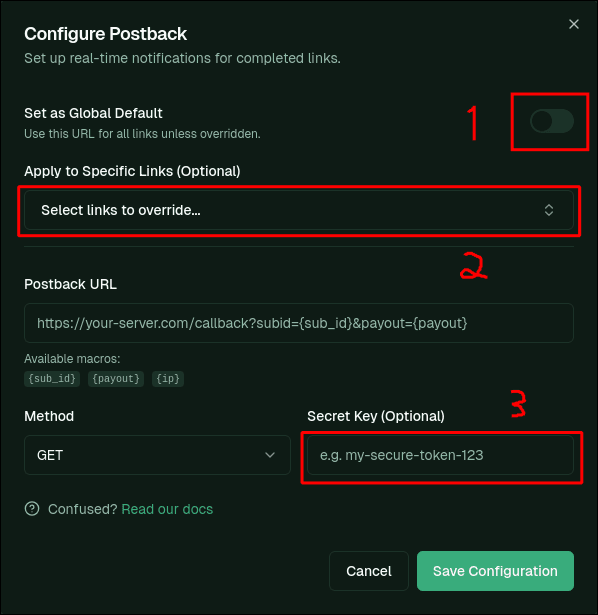
Configuration Options (from image)
1. Global Default
You can set a Global Postback URL that applies to all your links by default. This is useful if you use a single tracking endpoint for everything.
2. Specific Link Overrides
You can override the global setting for specific links. In the Postback modal, simply select the links you want to configure from the dropdown.
3. Secret Key
The Secret Key is an optional security feature. If provided, AdMint will send this key in the X-Postback-Secret HTTP header. You can verify this key on your server to ensure the request is genuinely from AdMint.
Available Macros
You can use the following macros in your Postback URL. AdMint will replace them with actual values before sending the request.
| Macro | Description |
|---|---|
{sub_id} | The unique ID of your AdMint link. |
{ip} | The IP address of the user who completed the link. |
{payout} | The estimated payout for the conversion (this may change if later rejected). |
Example URL
https://your-server.com/callback?cid={sub_id}&payout={payout}&ip={ip}